

Geek Speak: Random Mac Stuff You Need to Know
http://www.macfanatic.net/blog/
Copyright © 2006 Matt Brewer
Looking at XCode 3.0 for Leopard
by Matt Brewer
Leopard is big! No matter how you look at it, Apple did developer’s right this time around and gave us even more awesome technologies to use in our applications and better tools to take advantage of all that. While we might not see Leopard on new Macs for another few months (or as early as January, just depends if you place your faith in the rumors), Apple has already given developers a really in-depth look at the upcoming technologies and tools at WWDC this past summer and now there are articles available online for everyone, as well as a specialized Leopard area in ADC for the Select and Premier members. I still can’t talk about the secret stuff, although most of it has been disclosed at this point, so we’re going to take a good first look at XCode 3 that will debut with Leopard next year.
XCode 3
XCode 3 brings a lot of awesome new features to the development environment on Macs. I love XCode because of the integration and workflow management, but there are times that I switch and use TextMate simply because TextMate is hands-down better than XCode’s editor in the 2.x versions. That will all change for XCode 3.0.
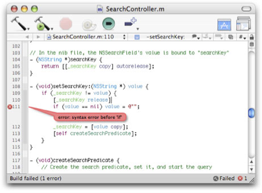 Stuff that I love from TextMate has made its way into XCode for the new
version; better code completion and suggestion, improved syntax highlighting,
more syntax coloring options, collapsible functions as well as highlighted
code help you view what is important to you at a quick glance.
Stuff that I love from TextMate has made its way into XCode for the new
version; better code completion and suggestion, improved syntax highlighting,
more syntax coloring options, collapsible functions as well as highlighted
code help you view what is important to you at a quick glance.
However, what really gets me excited about this new version is the way that the tasks of Debugging, Building, and Editing have further been integrated into one window. I use the All-in-One view in XCode 2.x so that I can maximize my screen space to see the most code available at one time. XCode 3 takes this a step further in a few ways. First, when you build your application, the build errors will show up as a bubble in the editor window. While you can see this in your code already in the Editor window as a little ‘X’ icon by the line number (and subsequently clicking on that provides more feedback in the bottom of the window), this method makes much more sense and should help you easily find mistakes in your code and rebuild quickly.
Another feature that I’m really excited about is the way the Debugger has been integrated into the Editor as well. When you use Build and Go or Run in XCode 3, you’ll stay in the editor but a toolbar with the Debugger buttons will appear. You will also be able to mouse over your code to view your variable values and addresses as the application is running!
And yet another great feature of XCode 3 is Milestones. Version control, be it Subversion, CVS or any other choice is still integrated nicely into XCode, but with Milestones you can quickly save the state of your code and make changes. If those don’t work out, you simply revert to your last saved milestone when you know everything was working fine. A very welcome feature that I first got experience using in the new CSSEdit 2 released just a few weeks ago.
And probably what I find the most exciting of all the features for XCode 3 is re-factoring support. My excitement just goes to show you how much I like to keep my code clean and subsequently find the need to change the names of variables throughout my code. Before, this task was accomplished with a lot of Find and Replace operations. However, you can now use re-factoring to update all of your code. And when I say all, I even mean that XCode will fix your code and keep it KVC-compliant as well as update your bindings in your Nib files. That is amazing, ladies and gentlemen!
Conclusion
While I’m sure there are all kinds of other goodies that we’ll find, once we have a final version of XCode to use, the build that I have with Leopard is pretty impressive all the same. The other tools that Apple is providing will make visualizing your running application a reality, thanks to XRay, as well as Dashcode that allows you to quickly turnout professional widgets. I didn’t even cover some of the new features with Interface Builder 3, but it’s a major overhaul and a very welcome one at that. I talked with a member of the 3 or 4-person team that was responsible for the redesign of this application while at WWDC and she was very excited. Once I attended the session, I could understand why. IB has seen major improvements, but I’ll talk about that on another day.
For More Info
To read up more on all this great technology, you can check out the websites below.
Leopard Technology Series for Developers: Developer Tools Overview: http://developer.apple.com/leopard/overview/tools.html
Attend a Leopard Talk to get one-on-one experience with Leopard. And it’s free! http://developer.apple.com/events/techtalks/
Contact Info
You can always send me an email at mbrewer at macCompanion dot com or visit my website at http://www.macfanatic.net/blog/ for more information about me and my ramblings. I also produce a weekly audio podcast taking an in-depth review of cool and new Mac applications, along with tips, tutorials, and developer interviews.
