
Overflow 2.0
reviewed by Michele Patterson
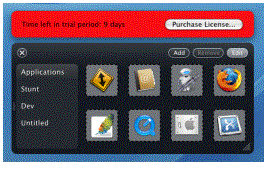
Stunt Software 648 Gertrude Avenue Winnipeg, MB R3M 2M9 Canada Released: October 2006 $15 USD, $15 CND. Audience: Mac users who have the need for a program that keeps all your most commonly used programs within a clicks reach. Strengths: Virtually flaw free, no errors and very user friendly. The ability to keep all your program icons in one easy to access space without having your dock become overly large helps keep your screen free of unneeded icons. A 20-day trial with the offer of a 10-day extension keeps you wanting more. Weaknesses: Overflow has not as of yet been able to disable to dock that comes with all newer Mac computers. They are looking into it, but as of yet haven’t found a way to disable it. |
|



 What
they say: The new intuitive software is clean and simple to use. Being
able to drag your program icons to the dock and then organize them into
categories of your choosing out weights the $14.95 nominal fee they charge.
What
they say: The new intuitive software is clean and simple to use. Being
able to drag your program icons to the dock and then organize them into
categories of your choosing out weights the $14.95 nominal fee they charge.
What I say: Where have you been for the last 3 years of my life? I defiantly won’t be letting this gem go anytime soon. It was so labor intensive to pick through my application folder in the past, to find everything I needed took longer then necessary. Other programs have offered this in the past, but this one has been virtually pain-free. I love being able to pop into the Edit mode and move things around no chance of accidentally deleting a link or dragging something out and it poffing away! For me screen space is a prize I cannot lose and being able to keep all icons and folders within Overflow has helped with that. I would like for them to override the Mac dock, but until then, I will continue to keep everything in my Overflow.
Summary: If you find that you use 3 or more programs a day and need to maintain all your documents, servers and other icons in one easy to access place, try Overflow for 20 days and see if its right for you. I think you’ll be pleasantly surprised.
