
WheresTheFreeSpace v0.1
reviewed by Eddie Hargreaves
iProv, LLC 2801 South University Avenue Little Rock, AR 72204 (501) 683-7229 Product Site: http://www.wheresthefreespace.com $30 USD downloadable; $40 USD boxed. Requirements: Mac OS X Strengths: Can reveal space used by file type and user. Weaknesses: Poor interface; does not reveal file sizes; limited functionality. |
|


Even though the capacity of hard drives has increased dramatically in the last decade (current iMacs contain 160GB or 250GB hard drives) that seemingly endless space can disappear quickly thanks to Mac OS X's multi-lingual capabilities, the importing of digital audio and video files, and just-plain-massive applications (the newest versions of iDVD and GarageBand use at least 7GB combined).
If you want to know where all that space is going, you might try and use the Finder. That is a mistake, as there are a number of hidden directories and other folders that are off-limits even to an admin user. So your best bet is an application designed for the task.
WheresTheFreeSpace, a hard disk space manager for Mac OS X, aims to be that application. Unfortunately, it falls short in a number of respects.
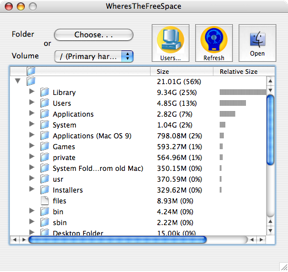
First, although WheresTheFreeSpace doesn't use brushed metal, its interface is still unattractive. The button graphics look like they were borrowed from an older version of Microsoft Windows and the pop-up menu to choose the Volume isn't even long enough to say Primary hard Disk, the option I think most users are going to choose by default. In addition, the window isn't even sized wide enough by default to view the four columns shown. A quick trip to the green resize button should solve that, except that it's disabled. You have to manually resize the window using the bottom right corner (and the new size will not be remembered after relaunching the application.
After selecting a drive or a folder to measure, a progress bar appears at the bottom of the window. But the bar doesn't actually measure progress. Instead it just displays the standard spinning blue barber pole and says "this may take a while." Seriously.
After 'a while' has passed, a single folder icon appears in the window, which uses a typical list view with hierarchical reveal arrows. The one column which is unique is Relative Size, which shows a bar graph sized to the proportion of the folder's size.
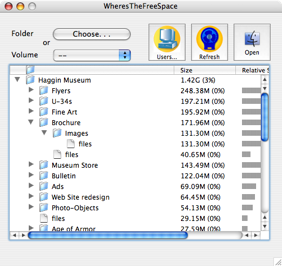
And by folder's size, I don't mean by file size. Because although the program's marketing materials state that it "will tell you exactly which files on your hardrive are taking up the most space," it will not even tell you what files are in the folders. For example, I have a folder that uses up 42MB of space and I wanted to know what files took up that space. Drilling down to that folder by clicking the arrows only tells me that there are "files" that take up 42MB of space. I then need to click the Open button to open that folder in the Finder and count them up myself. In addition, you cannot simply double-click on the folder to open it, you have to use the Open button. Imagine if this were the way the Finder worked: you had to select a folder, then mouse up to a button on the toolbar and click Open...
If this were a $5 shareware program, these flaws may be forgivable. But it costs at least $30 when a far superior program, ID-Design's WhatSize is far superior and is absolutely free. So it's hard to justify spending any money on an inferior application.
What WheresTheFreeSpace does have in its favor is its ability to "filter" by file type. You might expect this to mean that you could just select 'Photoshop file' from a pop-up menu and the results you previously waited "a while" for would limit themselves to just those files. Instead, you have to go to the preferences, type in the suffix (in this case: psd) and select the "Include only these extensions" option. Then you have to remeasure what you may have already measured. Nonetheless, it works and it could be very useful.
In addition, WheresTheFreeSpace can reveal your space usage on network volumes. If you work in an environment where your network administrators give you a limited amount of space on one or more servers, you can find out which folders (but not files) are taking up your quota.
Knowing how much space you do or don't have left may not be too important during the first few months of your Mac's life, but as time goes by you'll realize your hard drive isn't as big as you'd like it to be. Determining where that space went can be done with WheresTheFreeSpace, but it is neither the best, nor the most affordable choice for Mac OS X.
